How to Use Synthesia AI: 15 Powerful Ways to Create AI Videos in 2026
Learning how to use Synthesia AI can completely change the way you approach video creation.
Traditional video production can require cameras, microphones, actors, recording equipment, editing software, and hours of production work.
Synthesia takes a different approach.
The platform allows you to create videos using artificial intelligence, including AI avatars and generated voices. Instead of filming every presentation yourself, you can turn written content into presenter-style videos.
This makes AI video creation much more accessible to beginners, marketers, educators, businesses, content creators, and anyone who wants to produce professional-looking videos without building a traditional recording studio.
In this guide, we’ll explore how to use Synthesia AI in 15 practical ways and how you can incorporate it into your content and marketing workflow.
What Is Synthesia AI?
Synthesia is an AI video creation platform designed to turn written content into videos.
One of its best-known features is its collection of AI avatars. These digital presenters can deliver the script you provide without requiring you to record yourself on camera.
Synthesia also provides AI voices, video templates, translation and localization features, screen recording, media tools, and other capabilities for creating and editing videos.
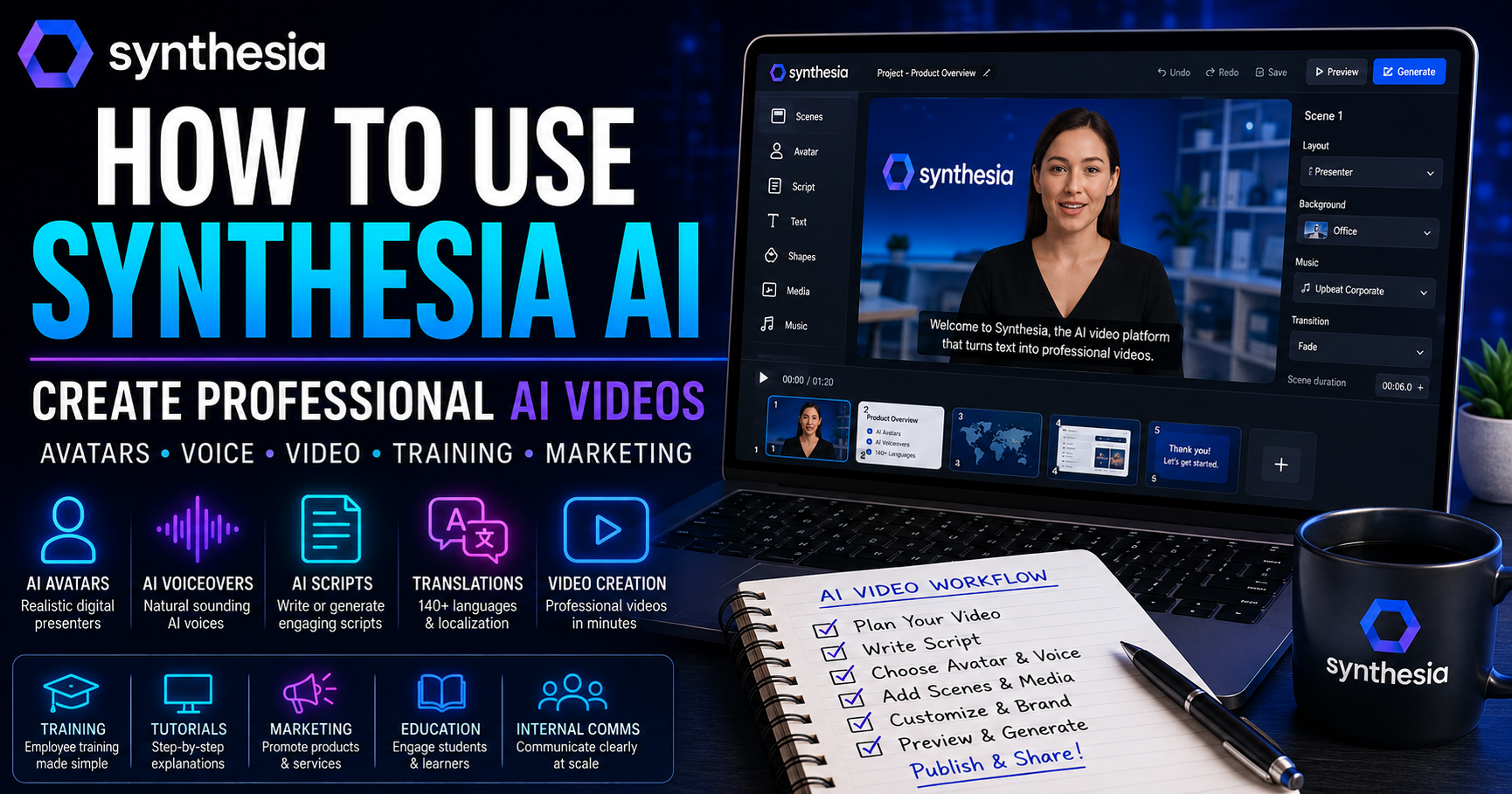
The basic workflow is straightforward:
Choose a video format → Add your script → Select an AI avatar and voice → Customize your scenes → Generate your video
This allows people with limited video-production experience to start creating professional video content.
Why Learn How to Use Synthesia AI?
Video has become an important part of online communication.
Businesses use video for marketing.
Companies use it for employee training.
Educators use it for lessons.
Content creators use it for social media.
Website owners use it to explain products and services.
However, traditional video production can be expensive and time-consuming.
Learning how to use Synthesia AI gives you another option.
Instead of recording every piece of content manually, you can use AI to speed up parts of the production process while still controlling the message, structure, branding, and final presentation.
Let’s look at 15 practical ways to use it.
1. Create AI Presenter Videos
The easiest way to begin is with a simple presenter video.
Start a new video project and select an AI avatar that suits the style of your content.
Then write or paste your script.
The avatar can present the script using an AI-generated voice.
This can work particularly well for:
- Tutorials
- Business presentations
- Educational videos
- Product explanations
- Internal communications
- Short informational videos
Start with a short project while learning the interface.
Once you’re comfortable with the basic workflow, you can experiment with more advanced features.
2. Turn Written Articles Into Videos
If you already create blog content, you don’t necessarily need to develop every video idea from scratch.
You can repurpose an existing article.
Take the most important sections and convert them into a shorter video script.
For example, a 2,000-word article could become a concise five-minute explainer video.
Don’t simply paste the entire article into your script.
Written content and spoken content work differently.
Shorten long sentences, remove unnecessary details, and make the language conversational.
This creates a powerful content-repurposing workflow:
Blog Article → Video Script → AI Video → Social Content
One piece of research can therefore produce several different forms of content.
3. Create Training Videos
Training is one of the most practical applications of AI video.
Businesses regularly need videos explaining:
- Company procedures
- Software systems
- Safety information
- Customer service processes
- Employee onboarding
- Product knowledge
- Workplace policies
Instead of repeatedly recording presenters whenever information changes, teams can update scripts and regenerate sections of their training content.
This can make maintaining a video library considerably easier.
4. Build Step-by-Step Tutorials
Tutorials are another excellent way to learn how to use Synthesia AI.
Choose one specific task and explain it step by step.
For example:
- How to create a WordPress blog post
- How to organize a project in Notion
- How to write a ChatGPT prompt
- How to use an AI productivity tool
Divide the tutorial into short scenes.
Each scene should explain one clear step.
This makes the video easier for viewers to follow and easier for you to edit later.
5. Create Product Demonstration Videos
If you sell a digital product, course, software service, or other online offer, video can help potential customers understand what they’re buying.
Use an AI presenter to introduce the product.
Then combine the presentation with:
- Screenshots
- Screen recordings
- Product images
- Feature demonstrations
- Text overlays
- Calls to action
The goal should be to demonstrate the value of the product rather than simply listing features.
Show the viewer what problem the product solves.
6. Create Marketing Videos
Synthesia can also be incorporated into a marketing workflow.
For example, you could create videos explaining:
- A service
- A product benefit
- A special offer
- A business solution
- An educational concept related to your product
- A common customer problem
- Keep marketing videos focused.
One video should generally communicate one primary message.
Trying to explain every feature in one video often weakens the overall message.
7. Create Videos Without Appearing on Camera
Not everyone wants to appear on camera.
That shouldn’t prevent someone from using video marketing.
AI avatars provide an alternative.
You can write the message yourself while allowing a digital presenter to deliver it.
This is particularly useful for creators building faceless brands.
However, don’t confuse “faceless” with “personality-free.”
Your ideas, examples, branding, storytelling, and point of view can still make the content distinctive.
8. Use AI to Help Write Video Scripts
Creating the video is only part of the process.
You still need a good script.
Synthesia provides AI-assisted capabilities that can help users create or transform material into video content.
A useful script structure is:
Hook → Problem → Explanation → Solution → Example → Call to Action
For example:
- Hook: Creating professional video normally takes time.
- Problem: Beginners may not have cameras, editing experience, or presentation skills.
- Solution: AI video platforms can simplify parts of the process.
- Example: Demonstrate the workflow.
- CTA: Encourage viewers to try the next step.
AI can help draft the script, but you should still edit it before generating the final video.
Need help developing the script first? Read our guide on [ChatGPT for Content Creation].
9. Add AI Voiceovers
AI-generated voice is another important part of Synthesia.
Rather than recording narration manually, you can select an appropriate AI voice for the presentation.
Pay attention to:
- Voice style
- Pacing
- Pronunciation
- Language
- Presentation tone
A corporate training video may require a different voice from a casual social-media explainer.
Always preview your content before finalizing it.
Names, acronyms, technical terms, and unusual words may require extra attention.
10. Create Videos in Multiple Languages
One particularly useful application of AI video is localization.
A business may create one piece of training or marketing content and then need versions for audiences speaking different languages.
Synthesia provides translation and multilingual video capabilities that can help adapt video content for different audiences.
This can be useful for:
- International businesses
- Online courses
- Global training programs
- Customer education
- Multilingual marketing
Localization still deserves human review, particularly when accuracy and cultural context matter.
11. Create Educational Videos
Teachers, trainers, coaches, and online educators can use AI video to explain concepts visually.
Instead of relying only on text, combine an AI presenter with:
- Diagrams
- Screenshots
- Images
- Short explanations
- Examples
- Key points displayed on screen
Breaking complex topics into several short videos can often be more effective than creating one extremely long lesson.
12. Create Internal Business Communications
Not every video needs to be published publicly.
Companies can use AI video for internal communication.
Examples include:
- Company announcements
- Project updates
- Process changes
- New employee introductions
- Training updates
- Policy explanations
- Leadership messages
This can be particularly useful when the same information needs to be communicated consistently to many people.
13. Customize Videos With Your Branding
A professional video should look connected to the business or creator publishing it.
Use consistent:
- Fonts
- Logos
- Layouts
- Visual styles
- Images
- Messaging
- Calls to action
Brand consistency becomes especially important when you’re producing multiple videos.
Instead of designing every project from scratch, establish a repeatable visual system.
This can save time while making your content more recognizable.
14. Repurpose Videos for Social Media
A finished long-form video can become several smaller pieces of content.
For example, take one educational video and extract ideas for:
- Instagram Reels
- TikTok videos
- YouTube Shorts
- LinkedIn posts
- Facebook content
- Email campaigns
- Blog articles
The underlying idea is simple:
Create once → Repurpose many times
This approach is particularly valuable for small businesses and solo creators who cannot spend all day producing content for different platforms.
You can also use AI to develop the captions and supporting posts. See our guide to [ChatGPT for Social Media].
15. Build a Complete AI Video Workflow
The most powerful way to learn how to use Synthesia AI is to stop thinking about it as an isolated video generator.
Build a system around it.
For example:
Topic Research → Outline → Script → AI Avatar → Voice → Visuals → Generate → Review → Publish → Repurpose → Measure
Each stage has a purpose.
Research ensures the topic is useful.
The outline organizes the message.
The script determines what viewers hear.
Visuals support the explanation.
Review catches mistakes.
Repurposing increases the value of the finished video.
This turns AI video creation into a repeatable content-production workflow.
For another approach to AI video creation and editing, see our complete guide on [how to use Runway AI]
How to Write Better Scripts for Synthesia AI
A sophisticated AI avatar cannot rescue a poor script.
Keep sentences relatively short.
Write for speaking rather than reading.
Avoid unnecessary jargon.
Use transitions between ideas.
Read the script aloud before generating the video.
If a sentence feels awkward when you say it yourself, it may also sound awkward when delivered by an AI presenter.
Most importantly, focus on the viewer.
Ask:
What does this person need to understand after watching the video?
Build everything around that answer.
Synthesia AI for Content Creators
Content creators can use Synthesia to increase the number of formats they produce without dramatically increasing production requirements.
A creator might start with a written tutorial.
That tutorial becomes a video script.
The script becomes an AI-presented video.
The video then becomes several short social-media clips.
The key isn’t simply producing more content.
The goal is getting more value from the research and ideas you’ve already created.
Synthesia AI for Small Businesses
Small businesses often face a different problem.
They need professional marketing and training materials but may not have a dedicated video-production department.
AI video tools can reduce some of that barrier.
Potential applications include:
- Product explanations
- Frequently asked questions
- Customer onboarding
- Staff training
- Marketing campaigns
- Sales presentations
- Internal announcements
- Educational content
A small business can therefore experiment with video before investing heavily in traditional production.
Synthesia AI for Affiliate Marketing
AI video can also support affiliate marketing when used responsibly.
For example, an affiliate marketer could create an educational video explaining how a particular software tool works.
The video could demonstrate:
- What the product does.
- Who it is designed for.
- Important features.
- Potential advantages.
- Potential limitations.
- How to get started.
The associated affiliate link should always be disclosed clearly.
The strongest affiliate content helps the audience make a decision rather than simply trying to generate a click.
Can Synthesia Help You Create YouTube Videos?
Yes, but the strategy matters.
You could use Synthesia to create:
- Software tutorials
- Educational explainers
- Business videos
- Product guides
- AI tutorials
- Training content
- Faceless informational videos
However, simply generating hundreds of nearly identical AI videos is unlikely to build a strong brand.
Original research, useful explanations, good editing, distinctive ideas, and audience understanding still matter.
Use AI to improve production efficiency—not to eliminate originality.
Synthesia vs Traditional Video Production
Traditional video production still has advantages.
Real presenters can communicate emotion, personality, authenticity, and spontaneity in ways that AI-generated presenters may not always reproduce.
AI video has different strengths.
It can make it easier to:
- Produce repeatable content.
- Update scripts.
- Create multilingual versions.
- Avoid repeated filming.
- Scale training materials.
- Experiment with video inexpensively.
The right choice therefore depends on the project.
Some businesses may even use both.
Is Synthesia AI Good for Beginners?
Synthesia is designed to make AI video creation accessible to people who don’t necessarily have traditional video-production skills.
Beginners should start small.
Create one short video.
Learn how scenes work.
Experiment with an avatar.
Test several voices.
Add simple visuals.
Generate the video.
Watch the finished result carefully.
Then improve the next one.
You don’t need to understand every feature before producing your first useful video.
Is Synthesia AI Worth Using in 2026?
Synthesia is worth considering for people and businesses that regularly need presenter-style videos but don’t want to record every video traditionally.
Its strongest use cases include:
- Training.
- Education.
- Business communication.
- Marketing.
- Product explanations.
- Tutorials.
- Multilingual video.
- Content repurposing.
Whether it makes financial sense depends on how frequently you create videos and which features you need.
For someone producing one video every few months, simpler alternatives may be sufficient.
For organizations and creators producing videos regularly, the time saved can become much more significant.
Can You Make Money Promoting Synthesia AI?
This is particularly important for a website covering AI tools.
Synthesia currently operates an official affiliate program.
That means publishers who are accepted into the program can potentially earn commissions by referring eligible customers.
This makes Synthesia especially interesting because an educational article can serve two purposes:
First, it can attract readers searching for how to use Synthesia AI.
Second, once the website has an approved Synthesia affiliate relationship, the article could potentially be monetized with appropriate affiliate links.
Final Thoughts on How to Use Synthesia AI
Learning how to use Synthesia AI opens another side of artificial intelligence beyond chatbots and text generation.
AI can now assist with the entire video-production workflow, from scripts and avatars to voices, translation, presentation, and content repurposing.
The technology becomes most valuable when you combine it with a clear strategy.
Don’t create a video simply because AI makes video creation easier.
Start with a useful idea.
Understand the audience.
Write a strong script.
Choose appropriate visuals.
Review everything carefully.
Then publish.
Used correctly, Synthesia can become part of a larger system for creating educational content, marketing materials, training videos, product demonstrations, and online business assets.