How to Use Fireflies AI: 15 Powerful Ways to Improve Meetings in 2026
Learning how to use Fireflies AI can change the way you handle meetings, interviews, calls, team discussions, and other important conversations.
Instead of trying to listen, take notes, remember decisions, and write down action items simultaneously, Fireflies can help capture and organize much of that information for you.
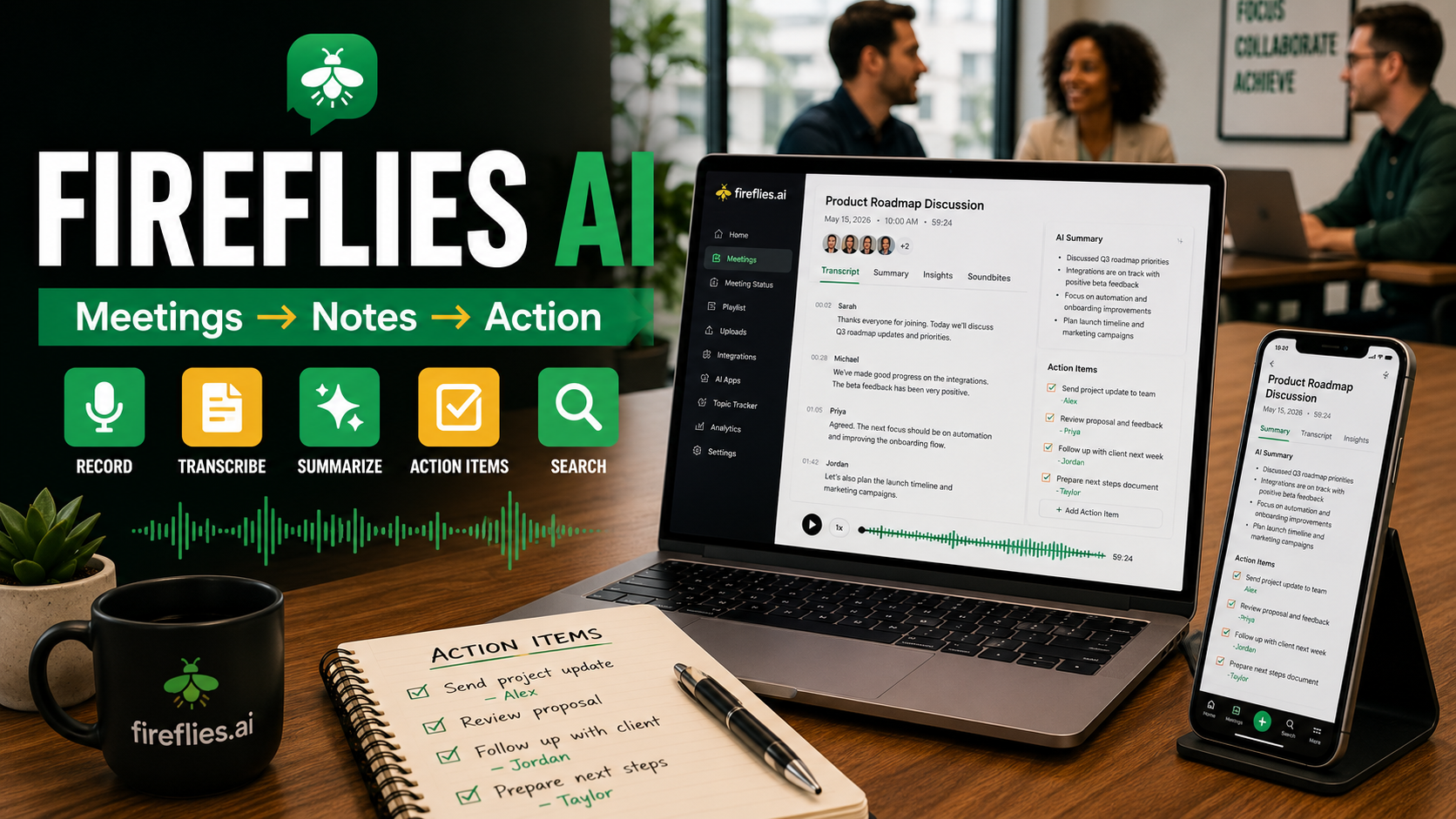
Fireflies is an AI meeting assistant designed to record, transcribe, summarize, search, and analyze conversations. It can also identify speakers, generate action items, answer questions about previous meetings, and help teams turn conversations into useful information.
For beginners, the number of features can initially seem like a lot.
You don’t need to use everything.
The best approach is to begin with the features that solve a real problem in your work and gradually develop a more complete workflow.
In this guide, we’ll explore 15 practical ways to use Fireflies AI in 2026.
What Is Fireflies AI?
Fireflies AI is an AI-powered meeting and conversation assistant.
Its core capabilities include:
- Recording conversations
- Creating transcripts
- Generating AI meeting summaries
- Identifying speakers
- Extracting action items
- Searching previous conversations
- Analyzing meetings
- Creating soundbites
- Answering questions about meetings
- Sharing meeting information with others
Fireflies can capture online meetings, uploaded audio and video, and in-person conversations through its mobile and desktop options.
That makes it useful for far more than simply creating meeting minutes.
It can become a searchable record of conversations and decisions.
How to Use Fireflies AI: Getting Started
Before exploring advanced features, start with a simple workflow.
- Create your Fireflies account.
- Connect the calendar or meeting tools you actually use.
- Configure your recording and privacy preferences.
- Let Fireflies capture a test meeting.
- Review the transcript and AI summary.
- Check the generated action items.
- Adjust your settings before using it regularly.
Don’t connect everything immediately.
Understanding the basic workflow first makes Fireflies much easier to manage.
1. Automatically Transcribe Your Meetings
One of the most straightforward ways to learn how to use Fireflies AI is meeting transcription.
Instead of writing everything manually, Fireflies converts conversations into searchable text.
This can be particularly useful for:
- Team meetings
- Client calls
- Interviews
- Training sessions
- Sales conversations
- Project discussions
Fireflies currently advertises transcription across 100+ languages as well as speaker recognition and automatic language detection.
You can therefore concentrate more on the conversation rather than trying to document every sentence.
2. Generate AI Meeting Summaries
A transcript can contain thousands of words.
You probably don’t want to reread the entire thing every time you need to remember what happened.
Fireflies can generate summaries that organize the most important information from a conversation.
A useful post-meeting routine is:
Meeting → Transcript → Summary → Action Items → Follow-up
This transforms a recording into something you can actually use.
3. Automatically Capture Action Items
Meetings often end with statements such as:
“I’ll send that tomorrow.”
“We’ll update the page next week.”
“Someone needs to contact the customer.”
The problem is remembering who agreed to do what.
Fireflies can identify action items from conversations and include them in meeting notes. Its real-time tools can also surface action items while a meeting is happening.
This makes Fireflies useful for project management as well as note-taking.
4. Search Previous Meetings
Imagine remembering that someone mentioned an important statistic three months ago but not remembering which meeting contained it.
Normally, finding it could be frustrating.
Fireflies provides meeting and transcript search so previous conversations can become searchable knowledge rather than forgotten recordings.
This becomes increasingly valuable as your meeting library grows.
5. Ask Questions With AskFred
Fireflies includes an AI assistant called AskFred.
Instead of manually searching through a long conversation, you can ask questions about your meeting information.
For example:
- What were the main decisions?
- What concerns did the customer raise?
- What tasks were assigned?
- What did we decide about the deadline?
- What were the most important ideas?
Fireflies also integrates AskFred into its real-time meeting experience, allowing users to ask questions while a meeting is underway.
Think of it as conversational search for your meetings.
6. Create Follow-Up Emails Faster
After an important meeting, someone usually needs to summarize what happened.
Instead of starting with a blank page, use the transcript and meeting summary to prepare your follow-up.
A simple workflow could be:
- Review the AI summary.
- Confirm the key decisions.
- Check the action items.
- Generate a follow-up email.
- Edit it for accuracy and tone.
- Send the final version.
Always review AI-generated communication before sending it.
Names, deadlines, prices, commitments, and other important details deserve human verification.
7. Prepare for Your Next Meeting
The value of an AI meeting assistant doesn’t have to end when a meeting finishes.
Previous conversations can help prepare for the next one.
Before an upcoming meeting, review:
- Previous decisions
- Outstanding tasks
- Customer concerns
- Important questions
- Promised follow-ups
- Unresolved issues
Fireflies’ current Live Assist experience includes meeting-preparation context alongside live transcripts and notes.
This can make recurring meetings considerably more productive.
8. Record In-Person Conversations
Not every important conversation happens on Zoom or Google Meet.
Fireflies’ mobile app can record, transcribe, and summarize in-person conversations, including meetings, interviews, and voice notes.
Possible uses include:
- Face-to-face meetings
- Interviews
- Brainstorming sessions
- Conferences
- Personal voice notes
Remember that recording laws and consent requirements vary by location.
Always make sure participants know when a conversation is being recorded and follow applicable rules.
9. Turn Important Moments Into Soundbites
Sometimes you don’t need an entire meeting.
You need one important moment.
Fireflies allows users to create Soundbites from conversations so key moments can be isolated and shared.
This could help you preserve:
- Customer feedback
- Important explanations
- Key decisions
- Training moments
- Strong ideas
Rather than telling someone to listen to a 45-minute recording, you can direct them to the relevant section.
10. Analyze How Meetings Are Going
Fireflies goes beyond transcription through conversation intelligence.
Its current platform includes features such as speaker talk-time, sentiment analysis, AI filters, and topic tracking.
These features may help teams identify patterns that are difficult to notice from individual meetings.
For example, a manager could examine whether one person dominates conversations or whether particular subjects repeatedly appear in customer discussions.
Analytics should provide context—not replace human judgment.
11. Use Fireflies for Interviews
Fireflies can also be useful when conducting interviews.
Instead of splitting your attention between listening and writing notes, you can concentrate more fully on the conversation.
Afterward, use the transcript to review:
- Important answers
- Experience discussed
- Questions asked
- Follow-up points
- Key observations
However, AI should support—not make—important hiring decisions.
Human evaluation remains essential.
12. Organize Meeting Knowledge
Individual transcripts are useful.
An organized collection of transcripts can become far more valuable.
Fireflies’ meeting Notepad brings together AI summaries, transcripts, recordings, analytics and action items, with options to review, edit and share the information afterward.
Consider organizing conversations around areas such as:
- Clients
- Projects
- Sales
- Marketing
- Research
- Training
- Internal operations
Over time, you’re creating a searchable business knowledge base.
13. Turn Conversations Into Content Ideas
Meetings frequently contain content opportunities.
A customer question could become a blog article.
A repeated problem could become a tutorial.
An explanation could become a social-media post.
A training discussion could eventually become part of a digital product.
After an important conversation, ask:
What useful knowledge appeared in this meeting that could be turned into educational content?
This is particularly valuable for creators and small businesses.
One conversation might eventually produce:
- A blog post
- An email
- A short video
- A social-media post
- A FAQ
- A future course lesson
That’s how AI can help turn everyday work into a reusable content engine.
14. Build a Meeting-to-Action Workflow
Don’t stop at transcription.
Build a repeatable process.
For example:
Meeting → Transcript → Summary → Decisions → Tasks → Follow-Up → Knowledge Base
This is where Fireflies becomes more valuable.
The goal isn’t to collect thousands of transcripts nobody reads.
The goal is to convert conversations into action.
15. Combine Fireflies AI With Other AI Tools
Fireflies doesn’t need to replace the rest of your AI toolkit.
It can provide the raw information that other tools help transform.
For example:
Fireflies AI → meeting transcript
ChatGPT → turn insights into an outline
Canva AI → create graphics
Pictory AI → turn the content into video
Notion → organize the finished project
This creates an AI workflow rather than a collection of disconnected tools.
For more ideas, read our guides on ChatGPT for content creation, Canva AI, Pictory AI, and organizing work with Notion.
IMPORTANT: Make those four phrases internal links to your existing articles.
Fireflies AI vs Otter AI: What’s the Difference?
Since you already have an Otter AI article, we should introduce the relationship without turning Article #37 into the full comparison article.
Both platforms can help capture and summarize conversations.
For now, think of them as alternatives worth evaluating based on your specific meeting workflow, integrations, collaboration requirements, AI features, and budget.
We’ll eventually build a dedicated Fireflies AI vs Otter AI article where we can compare them properly.
That future article will have stronger commercial intent than either individual tutorial because the reader will be closer to choosing a product.
Is Fireflies AI Free?
Fireflies currently offers a Free plan as well as Pro, Business and Enterprise tiers.
As of July 2026, its published pricing lists Pro at $10 per user/month when billed annually or $18 monthly, Business at $19 annually or $29 monthly, and Enterprise at $39 per seat/month billed annually. Some advanced features use separate AI credits, so always check current pricing before purchasing.
Check current Fireflies plans and pricing
Don’t make price the main focus of our article because it can change.
Who Should Use Fireflies AI?
Fireflies may be particularly useful for:
- Business owners
- Remote teams
- Sales professionals
- Recruiters
- Consultants
- Researchers
- Content creators
- Project managers
- Students and educators
- Anyone attending frequent meetings
It becomes more valuable when important information regularly disappears into conversations.
Mistakes to Avoid When Using Fireflies AI
AI meeting tools are useful, but they need sensible oversight.
Avoid these common mistakes:
- Recording people without appropriate notice or consent.
- Assuming every transcript is perfectly accurate.
- Sending AI-generated follow-ups without reviewing them.
- Collecting meetings without organizing the information.
- Giving unnecessary people access to sensitive conversations.
- Treating AI summaries as a substitute for important human decisions.
Fireflies provides privacy and recording-notification controls, but users remain responsible for configuring and using meeting recording appropriately.
Final Thoughts on How to Use Fireflies AI
Learning how to use Fireflies AI isn’t really about eliminating note-taking.
It’s about creating a better system around conversations.
Start simply.
Use Fireflies to capture a meeting, review the transcript, check the summary, identify action items, and follow through on what matters.
Then gradually expand the workflow.
Conversation → Knowledge → Action → Content
That’s where an AI meeting assistant becomes much more powerful than a digital notebook.
And as your AI toolkit grows, Fireflies can work alongside tools such as ChatGPT, Canva AI, Pictory AI and Notion to help turn conversations into useful work.